
One place to plan, track and get work done
Manage projects, tasks and calendars in connected workspaces that keep your team aligned, organised and always on schedule.
No credit card needed · 14-day free trial

Workspaces That Keep Teams Aligned
Think of Workspaces as dedicated spaces for your departments, projects or client work. Each workspace keeps everything organised — tasks, documents, timelines and conversations — so your team always knows what is happening and what needs attention.
How this benefits you:
- Clear ownership: Separate work by department or project without confusion.
- Better visibility: See progress, responsibilities and deadlines at a glance.
- Stronger accountability: Escalations and notifications ensure nothing gets overlooked.

Pipelines & Project Management Made Simple
Create multiple pipelines or projects in each workspace and manage them your way — list view, Kanban boards or card views. Drag-and-drop tasks, add subtasks, checklists, tags, comments and documents, view timelines, and automatically notify supervisors if tasks are delayed.
How this benefits you:
- Work the way your team prefers: Switch between views without losing context.
- Stay on schedule: Deadlines, timelines and escalation rules keep projects moving.
- Everything in one place: Tasks, documents, updates and history — no tool hopping.

Tasks, To-Dos & Calendars That Work Together
Create to-do lists, assign tasks to colleagues, and get real-time notifications via the dashboard or email. Share calendars across teams, check availability for meetings, and connect seamlessly with Google Calendar and Outlook.
How this benefits you:
- Fewer missed tasks: Automatic notifications keep everyone accountable.
- Easier collaboration: See who is available and schedule meetings faster.
- One connected schedule: All tasks and meetings in one unified view.

All Your Business Emails. One Shared Inbox.
Connect your Google or Outlook accounts and manage every conversation from a unified inbox inside your workspace — without switching tools or losing context. Every email is automatically organised within the relevant client record, making it easy to track conversations, assign follow-ups and turn emails into tasks with clear due dates.
How this benefits you:
- No lost conversations: All emails stay linked to the right client.
- Better teamwork: Share inbox access and assign follow-ups effortlessly.
- Stronger accountability: Emails become tasks, tracked through workspaces and pipelines.
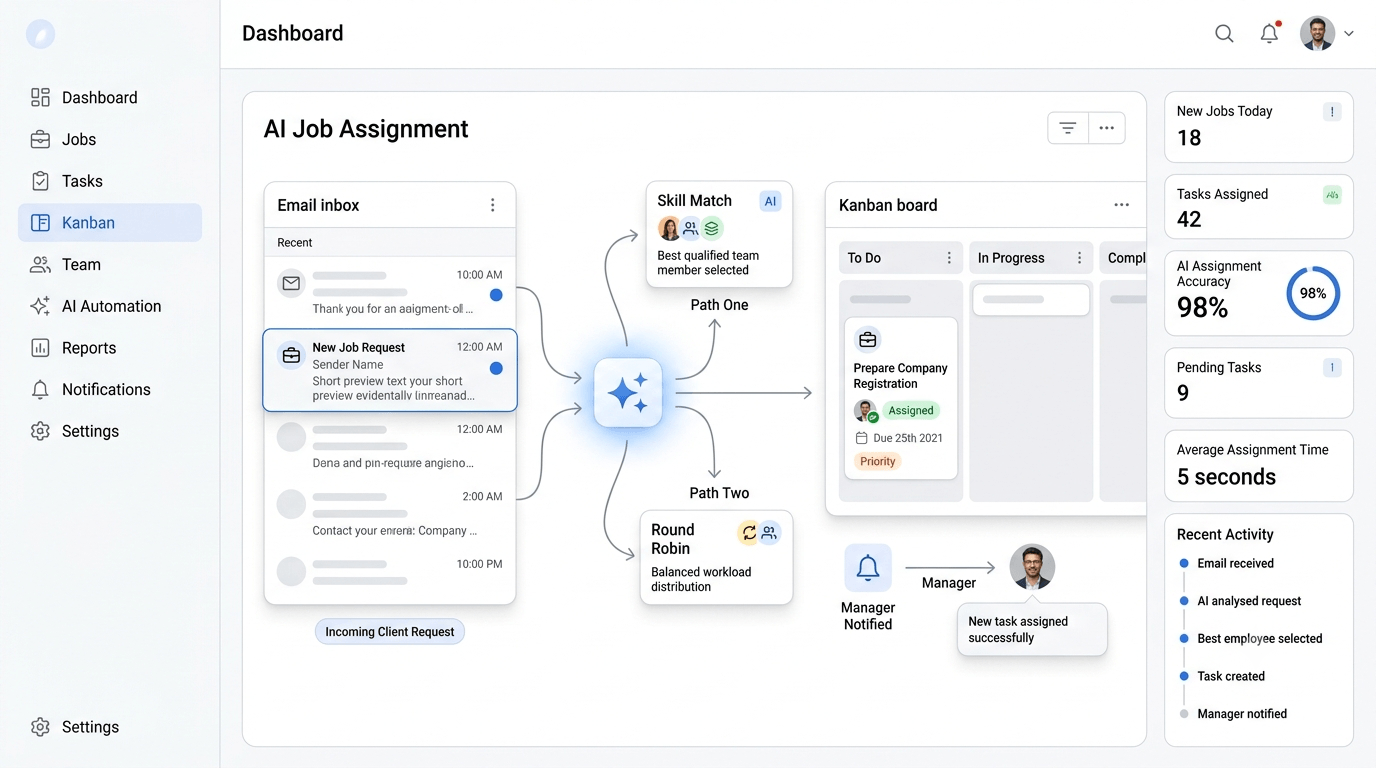
Jobs Arrive by Email? They Assign Themselves.
When a job request lands in your inbox, OneCosec reads it automatically and assigns it to the most relevant staff member — matched by ability, or distributed round-robin across the team. The manager is notified the moment every new job arrives, so nothing waits unnoticed in an inbox.
How this benefits you:
- Instant triage: The system reads incoming job emails and creates the work item for you.
- Smart assignment: Routed by skill and ability, or round-robin for even distribution.
- Manager visibility: Notifications on every new job that comes in by email.

Email Auto-Assist & Smart Automations
Set rules to automatically assign incoming emails to the right staff member, trigger follow-ups, and keep conversations moving — while you send and receive email just like you normally would. Use AI to draft replies and file attachments by contact in OneCosec Drive.
How this benefits you:
- Faster response times: Emails are routed instantly to the right person.
- Less manual sorting: Automation handles assignments and follow-ups for you.
- More consistent service: No email sits unread or forgotten.